





WinBoost Casino Registration
Membership at WinBoost Casino starts with a short registration form that asks for an email address, a password and the currency the account will run in. One of three supported currencies has to be picked at this stage, and the selected currency then becomes the currency of the balance. The email address also serves as the login name for every later visit.
Once the account is open, the cashier will accept a first payment of £10 or more, sent by bank transfer or with a cryptocurrency. Registered members can also take part in the VIP programme that the casino runs on the same account they use for slots and live tables.
- Open the WinBoost Casino website in a desktop or mobile browser.
- Start the sign-up form and type in your email address.
- Create a password for the new account.
- Pick the account currency from the three on offer.
- Submit the form, then fund the balance with at least £10.
Games Available at WinBoost Casino
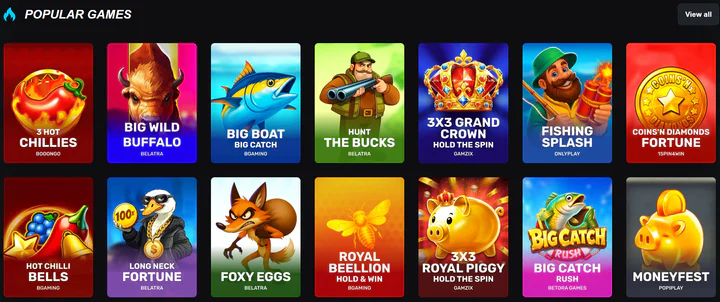
WinBoost Casino builds its catalogue from more than 40 game studios, and nine categories divide it: Slots, Crash Games, Jackpots, Poker, Table Games, Live Casino, Bingo, Scratch Cards and Virtual Sports. Among the suppliers are Onlyplay, NetEnt, Booming Games, Spinomenal, Novomatic, Microgaming, Nucleus Gaming and Booongo. Sports betting does not form part of the site.
Beyond the reels, players can sit at live dealer tables, join poker games or choose classic table games such as card and wheel formats. Short-session products sit in their own groups, crash games and scratch cards among them. Bingo draws and virtual sports races are listed as separate categories, so members can move between a draw, a simulated event and a slot within one session at WinBoost Casino.
The Slots
The slot titles listed among the most played at WinBoost Casino include Hot Chilli Bells, Ice Bass and Slime Bonanza, while Long Neck Fortune, Fruit Million Respin and Big Boat Big Catch belong to the same group. Several of them follow fishing or fruit themes, as Ice Bass and Fruit Million Respin show by name. The Jackpots category runs as its own section next to the regular slots.
Payments
Fiat money moves through bank transfer at WinBoost Casino, and the cashier also handles five cryptocurrencies: LTC, USDT, BTC, ETH and BCH. Balances are kept in the currency chosen at registration, out of the three that the site supports, and crypto payments sit alongside them as a second route for funding the account.
| Payment option | Kind |
|---|---|
| Bank transfer | Bank transfer |
| BTC | Cryptocurrency |
| BCH | Cryptocurrency |
| ETH | Cryptocurrency |
Depositing Money
Each deposit has to be at least £10, and this floor is the smallest sum the cashier takes. Members who prefer fiat can pay by bank transfer, while those holding coins can send BTC or ETH, or choose a stablecoin such as USDT. Litecoin and Bitcoin Cash complete the crypto options for players who keep balances in those coins.
Cashing Out
Payouts at WinBoost Casino run through the same set of methods, with bank transfer for fiat balances and the supported coins for crypto. The casino verifies the identity of a member before the first withdrawal is paid, and after that check later payout requests go through the same methods.
WinBoost Casino Mobile Access
WinBoost Casino runs in the mobile browser, and the casino does not distribute a separate app for phones or tablets. The account, the balance and the cashier open under the same login on a handset as on a desktop, and the slot titles, live tables and VIP programme are reached from that single account.
Customer Support Services
Members of WinBoost Casino can contact support by live chat or by email at any hour, as both channels are listed as running 24/7. An FAQ section sits next to these two contact routes and carries written answers for questions that do not need an agent, such as account settings or payment methods.
| Channel | Information |
|---|---|
| Email contact | Written reply |
| Help section | Online help centre |
| Chat | 24/7 |
Signing In to Your Account
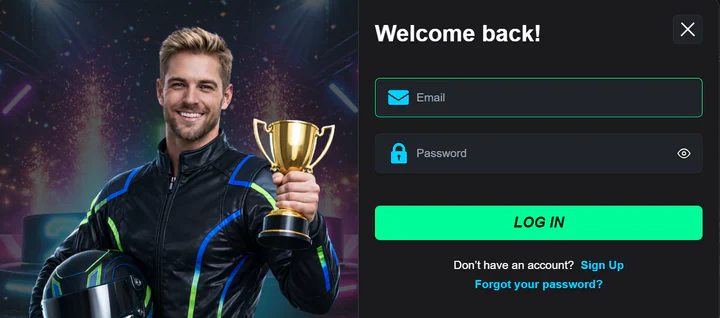
Access to a WinBoost Casino account uses the email address and the password set during registration. If the password is lost, a reset can be requested for the registered email address, and a new password is then created before the next sign-in.
- Open the site in a browser on a computer or a phone.
- Choose the sign-in option and type in your registered email address.
- Enter your password and confirm to reach the account.
- If the password does not work, request a reset to your email and set a new one.